The Online Archive is a secondary mailbox stored in Microsoft Exchange Online and accessible from Outlook. It is designed to reduce the amount of email stored in your primary mailbox while keeping older messages easy to reach.
About the Online Archive
The Online Archive is a subordinate account to your primary email account and, when enabled, appears in the left navigation pane in Outlook. In Figure 1, [A] is the primary email account folder and [B] is the Online Archive folder. You can access, search, and manage email in the Online Archive exactly as you would in your primary account.
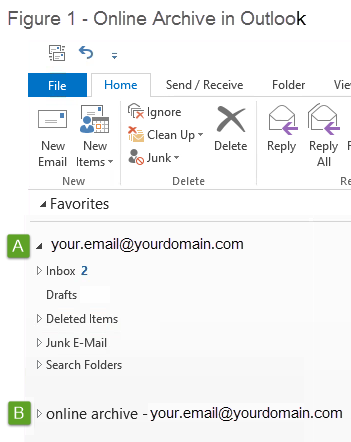
Figure 1: Primary mailbox [A] and Online Archive [B] in the Outlook navigation pane.
When emails appear in your archive
Email only appears in the Online Archive if your firm has established a policy to prune email from the primary Exchange account.
The primary advantage of the Online Archive is easy access to older email while reducing the size of your primary mailbox, which improves Outlook performance (such as search speed).
Example: If a firm sets a 12-month pruning policy, the primary account ([A] in Figure 1) would contain only email newer than 12 months, and the Online Archive ([B] in Figure 1) would contain all email that is 12 months or older.
Note: You can delete emails from your personal Online Archive.
Was this article helpful?
That’s Great!
Thank you for your feedback
Sorry! We couldn't be helpful
Thank you for your feedback
Feedback sent
We appreciate your effort and will try to fix the article