When you download a file from the internet or open an email attachment, Windows automatically tags the file with a hidden marker called the Mark of the Web (MOTW). This marker tells Windows and Microsoft Office that the file came from an external or potentially unsafe source, which changes how the file is allowed to behave when you open or preview it.
What is the Mark of the Web (MOTW)?
Because of the MOTW tag:
Office may open the file in Protected View (read-only) until you choose to trust it.
Scripts, macros, and other active content may be blocked for safety.
In Windows Explorer or Outlook, the Preview Pane may show a blank or limited preview, or block the preview completely, to prevent active content from running.
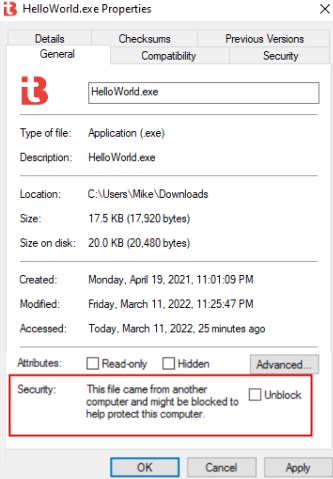
You can check whether a file is marked by right-clicking the file, choosing Properties, and looking for the Unblock checkbox at the bottom of the dialog.
Selecting Unblock tells Windows that you trust the file and want it to open or preview normally.
Why MOTW matters for security
MOTW is a security feature in Microsoft Windows that tags files downloaded from the internet or other untrusted sources with metadata indicating their origin. That metadata lets Windows and Microsoft Office open such files in a protected or read-only mode, which helps prevent malicious code from running automatically.
Without MOTW, files can appear as if they came from a trusted local source. Attackers can then exploit preview panes or auto-launch behaviors such as macros, embedded scripts, or active content to execute malware before the user fully opens the file. MOTW acts as an early warning system that blocks or limits the execution of potentially dangerous content, especially in email attachments, ZIP extractions, and document previews. This closes a critical vector for preview-launched malware.
Important: Only click Unblock on files you recognize and trust. Removing the Mark of the Web disables the safety checks for that file, so a malicious document or script can run as soon as you open or preview it.
Was this article helpful?
That’s Great!
Thank you for your feedback
Sorry! We couldn't be helpful
Thank you for your feedback
Feedback sent
We appreciate your effort and will try to fix the article